概要規約プライバシー連絡先
 
更新中
Sketch 3D

Sketch 3D

リリース: 2015-08-22
© 2015 - 2022 nurbs-g.com
Sketch 3D - QRコードは
バージョン 1.40
4+
App Storeからダウンロード
バージョン 1.40
4+
App Storeからダウンロード
リリース: 2015-08-22
© 2015 - 2022 nurbs-g.com

iPhone スクリーンショット

スクリーンショット
スクリーンショット
スクリーンショット
スクリーンショット
スクリーンショット

iPad スクリーンショット

スクリーンショット
スクリーンショット
スクリーンショット
スクリーンショット
スクリーンショット

説明

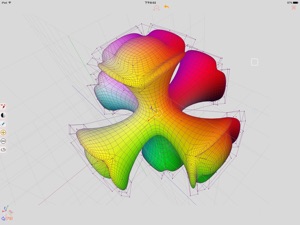
Sketch 3D is a tool for designing 3D models from your fingertips. You could download models from others, and could also share your great designs with other users by saving models in Public space.
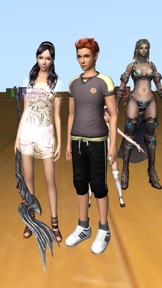
New feature: Use True Depth Camera to capture face model.
New feature: Support using video as model texture.
You could use video clips from Photo Album, or from Internet URL (YouTube URL not supported), and then apply it onto a model as texture map.
New feature: Capture movie from the 3D scene.
Note! If your device could not capture movie, then, could try out a smaller output resolution (by tapping the control pane). However, arbitrary output size may stop capturing prematurely.
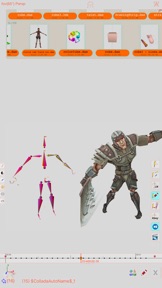
New feature: Design 3D model animation with skeleton structure.
You could design a skeleton structure by placing bones in hierarchical relation. Attach model to the skeleton, and then moving the bones to define different poses. Each pose represented as a keyframe in the timeline view. And animation sequence is produced by playing interpolation between the keyframes.
Features:
- Import 3D content directly from browser or email, either in .zip, .rar, .7z.
- Support formats: Collada DAE, OBJ, 3DS, STL(for 3D printing), and others.
- Import/export to iCloud drive, via iTune File Sharing, or to Public area via Apple CloudKit Service.
- Supports AirDrop.
- Support Quad faces.
- Smooth surfaces using Subdivision.
- Mirroring editing.
- 2-fingers vertex movement, 3 or 4-fingers planar shape creation.
- Versatile multi-touches drag-through-space gestures to support editing and changing viewing angle at the same time.
- Flexible face strip drawing.
- Stitching boundary faces. Stitch triangle soap into connected faces. Stitch over edge or vertex to form a larger face.
- Stitching Triangles to Quads.
- Loop Cut faces.
- Bevel edges.
- Extrude faces or edges.
- Revolve (Spin).
- Vertex Smoothing.
- Vertex Slide along edges.
- Crease Editing after mesh subdivision.
- Split mesh from, or Join mesh to the editing one.
- Support hierarchical mesh node structure.
- Direct vertex color editing when texture map is not used.
- Edit texture map UV coordinates, include atlas generation.
- 3D Text generation.
- Scene interaction with your created shape.
- Design Animation with skeleton structure.
- Capture movie from the 3D scene.
- Support using video as model texture map.

バージョン 1.40 の新機能

- Import model archive downloaded from Sketchfab.
- Cater for Dark Mode.
- Enhance importing of FBX model.

販売元

名前が

Victor Ng

情報

販売元

カテゴリ

バージョン

1.40

サイズが

42.3 MB

Game Center

はい

VPP Device Licensing

はい

レート

評価: 4+

互換性

iOS 8.0 以降

デバイス

iPhone 5s, iPhone 6, iPhone 6 Plus, iPhone 6s, iPhone 6s Plus, iPhone SE, iPhone 7, iPhone 7 Plus, iPhone 8, iPhone 8 Plus, iPhone X, iPhone XR, iPhone XS, iPhone XS Max, iPhone 11, iPhone 11 Pro, iPhone 11 Pro Max, iPhone SE (第 2 世代), iPhone 12, iPhone 12 Pro, iPhone 12 Pro Max, iPhone 12 mini, iPhone 13, iPhone 13 Pro, iPhone 13 Pro Max, iPhone 13 mini, iPhone SE (第 3 世代), iPhone 14, iPhone 14 Plus, iPhone 14 Pro, iPhone 14 Pro Max, iPad(第 5 世代) Wi-Fi, iPad(第 5 世代) Wi-Fi + Cellular, iPad(第 6 世代) Wi-Fi, iPad(第 6 世代) Wi-Fi + Cellular, iPad Pro, iPad Pro(Cellular), iPad Pro(9.7インチ), iPad Pro(9.7インチ)(Cellular), iPad Pro 12.9-inch (第 2 世代), iPad Pro 12.9-inch (第 2 世代) Wi-Fi + Cellular, iPad Pro (10.5-inch), iPad Pro (10.5-inch) Wi-Fi + Cellular, iPad Pro (11-inch), iPad Pro (11-inch) Wi-Fi + Cellular, iPad Pro 12.9-inch (第 3 世代), iPad Pro 12.9-inch (第 3 世代) Wi-Fi + Cellular, iPad Air, iPad Air(Cellular), iPad Air 2, iPad Air 2(Cellular), iPad Air(第 3 世代 ), iPad Air(第 3 世代 ) Wi-Fi + Cellular, iPad mini Retina, iPad mini Retina(Cellular), iPad mini 3, iPad mini 3(Cellular), iPad mini 4, iPad mini 4(Cellular), iPad mini(第 5 世代), iPad mini(第 5 世代) Wi-Fi + Cellular, iPad(第7世代) Wi-Fi + Cellular, iPad Pro 11 インチ (第 2 世代), iPad Pro 11 インチ (第 2 世代) Wi-Fi + Cellular, iPad Pro 12.9 インチ (第 4 世代), iPad Pro 12.9 インチ (第 4 世代) Wi-Fi + Cellular, iPad Air(第 4 世代)(Wi-Fi), iPad Air(第 4 世代)(Wi-Fi + Cellular), iPad(第8世代) Wi-Fi, iPad(第8世代) Wi-Fi + Cellular, iPad Pro 11 インチ (第 3 世代), iPad Pro 11 インチ (第 3 世代) Wi-Fi + Cellular, iPad Pro 12.9 インチ (第 5 世代), iPad Pro 12.9 インチ (第 5 世代) Wi-Fi + Cellular, iPad(第 9 世代), iPad(第 9 世代) Wi-Fi + Cellular, iPad mini(第 6 世代), iPad mini(第 6 世代) Wi-Fi + Cellular, iPad Air (第 5 世代), iPad Air (第 5 世代) Wi-Fi + Cellular, iPad Pro11FourthGen, iPad Pro11FourthGenCellular, iPad ProSixthGen, iPad ProSixthGenCellular, iPad TenthGen, iPad TenthGenCellular, iPod touch(第 6 世代 ), iPod touch(第7世代)

言語

ロシア語, 英語, 中国語

App Store: カスタマー評価

評価とレビュー

3.5/5 (12 つの評価)

App Store: カスタマーレビュー

2022-05-14

チュートリアルを下さい

チュートリアルが欲しいですね。
結構頑張らないと操作がわからないです。
ちょっといじった感想ですが。
感覚的にやってもまぁまぁ出来ました。
なんとなく形は作れたので星は3で。
Я хочу учебник.
ショートケーキ食べたい...
バージョン 1.39
2022-04-11

良い、操作が難しい

スマホで3DCGモデル制作はありがたい
ですが今後はSketchfabからダウンロードしたやつをエクスポートできるように更に改良して欲しいです
あと日本語対応も希望です
小悠鳥
バージョン 1.38
2022-02-23

3Dモデルのテクスチャプレビューが簡単にできる!

VRoidアバター用のテクスチャをスマホで描いてすぐに試すことができるのでとても役立っています。
初めはどこを押せばいいのか分かりませんでしたが慣れるととても重宝するアプリだと思います。
種子島ぺ
バージョン 1.38
2022-01-10

最高じゃねぇか

今まで見たアプリの中で1番ダナ
カメラを動かして動画にもできるのも最高じゃないですか〜。
でもまあ操作が少し難しいですかな〜。チュートリアルがあれば使いやすいケド…
あ、あと光の向きとか変えれたら多分iPhone史上最強のアプリになるのではないでしょーか!
神ってるアプリだから愛用してますん
It's the best app I've ever seen.
It's also great to be able to move the camera to make a video.
However, the operation is a little difficult. I think it would be easy to use if there was a tutorial.
If you can change the direction of the light, I think it will be the strongest app in iPhone history.
I like this app very much.
はにやすしんけいき難い←
バージョン 1.38
2020-04-21

操作方法が・・・。

操作方法が全くわからないので使いたくても使えない状態なので教えてほしい
Miki2568
バージョン 1.37
2020-04-01

メニュー

モデリングをスマホで、ということを考えればおおむね満足です。
最近アップデートでメニューのテキストが表示されなくなったので改善していただけたら良いなと…
-------
表示されなくなったのは、右上最上部のアイコンを押すことによって表示されるウィンドウのファイルマネージャーのテキストです。
-------
原因が判明しました!
iPhoneのダークモードのテーマです!
文字が白色になり、まるで文字が無かったことのように見えたのが原因です!
テーマを変えたらメニューの文字が見えまし
た。
ご迷惑をおかけしました!
sinono
バージョン 1.37
2019-12-15

まぁまぁ良かったと思います

簡単に操作できます。コツさえ覚えることができたらですが、、
ほうれん草パウダー
バージョン 1.36
2019-07-24

Great!

It is an extremely powerful 3D modeling software. The learning curve is very high, but it is the best non-subscription modeling software on the iPad. I have paid $12 for other similar apps, that have very limited features. The obj export works perfectly. It includes a mtl file and textures. Making it extremely easy to import into Codea (an iPad programming IDE)
tumoxe
バージョン 1.36
2019-04-26

Crashes

Does not work. Crashes immediately after opening. I am not using an old phone. This app is broken.
cれあて
バージョン 1.34