概要規約プライバシー連絡先
 
更新中
Scriptable

Scriptable

リリース: 2018-09-21
© 2020 Simon B. Støvring
Scriptable - QRコードは
バージョン 1.7.19
17+
App Storeからダウンロード
バージョン 1.7.19
17+
App Storeからダウンロード
リリース: 2018-09-21
© 2020 Simon B. Støvring

iPhone スクリーンショット

スクリーンショット
スクリーンショット
スクリーンショット
スクリーンショット
スクリーンショット
スクリーンショット

iPad スクリーンショット

スクリーンショット
スクリーンショット
スクリーンショット
スクリーンショット
スクリーンショット
スクリーンショット

説明

Scriptable is an automation tool that enables you to write scripts that integrates with native features of iOS such as files, calendars, reminders, documents and much more.
An extensive support for widgets enables you to write your own widgets using JavaScript and run the scripts on your Home Screen. Your widgets can show any data and be customised to look just the way you want.
With Siri Shortcuts you can present images, tables and more in Siri as well as making Siri read out loud a text when you run a script from a Siri Shortcut.
There's a growing gallery of scripts to get you started with Scriptable.
Here’s a few examples of scripts you can create:
- Ask Siri whether a web service is down.
- Create a widget that shows data from your weather station.
- Postpone the next event in your calendar half an hour.
- Check what is currently on TV.
- Manage a list of movies you would like to watch.
- Upload files to an image optimizer and store a URL to the optimized image.
- Receive a notification with the weather report every morning.
- Create todos with prefilled data in your favorite todo app using URL schemes.
Features include:
- Write and run JavaScript.
- Auto complete of variable names, functions, keywords and properties as you type.
- Access lots of native iOS features from your JavaScript code, including managing files, calendars, reminders, contacts, photos, location, pasteboard, web views and more.
- Create your own widgets. Your scripts run on the Home Screen without needing to open the app.
- Siri Shortcuts enabling you to present images, tables, websites, HTML and more in Siri as well as making Siri read out loud a text.
- Support for input and output parameters in Siri Shortcuts.
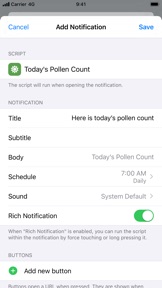
- Easily schedule rich notifications to run your scripts periodically.
- Work with files and directories from third party apps using File Bookmarks.
- Synchronise scripts to all of your devices using iCloud Drive.
- Scripts are stored as plain JavaScript files and can be browsed using the Files app.
- Assign one of over 800 glyphs and a color to a script to easily identify it in your directory of scripts.
- Run scripts directly on your Lock Screen and Home Screen using widgets.
- Run a script by 3D touching the app icon.
- Run a script from a share sheet and process the inputs.
- Schedule notifications and run a script directly from a notification.
- URL schemes enabling you to run scripts from other apps.
- Support for x-callback-url enabling advanced integration with other apps that support x-callback-url.
- Export and share scripts.
- Example scripts helping you get started creating your own scripts.
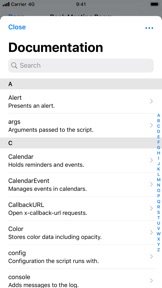
- Extensive documentation for all the native APIs you can use in your scripts. Available offline in the app and online on docs.scriptable.app.
- View the documentation in a separate window on iPad.
- Support for dark mode.
- Customise the editor to your liking.

バージョン 1.7.19 の新機能

Fixes an issue where background images were not shown in tintable widgets on iOS 18.

販売元

名前が

Simon Stovring

情報

カテゴリ

バージョン

1.7.19

サイズが

28.9 MB

Game Center

いいえ

VPP Device Licensing

はい

レート

以下の理由により 17+ のレーティングがついています。
無制限のWebアクセス

互換性

iOS 15.5 以降

デバイス

iPhone 5s, iPhone 6, iPhone 6 Plus, iPhone 6s, iPhone 6s Plus, iPhone SE, iPhone 7, iPhone 7 Plus, iPhone 8, iPhone 8 Plus, iPhone X, iPhone XR, iPhone XS, iPhone XS Max, iPhone 11, iPhone 11 Pro, iPhone 11 Pro Max, iPhone SE (第 2 世代), iPhone 12, iPhone 12 Pro, iPhone 12 Pro Max, iPhone 12 mini, iPhone 13, iPhone 13 Pro, iPhone 13 Pro Max, iPhone 13 mini, iPhone SE (第 3 世代), iPhone 14, iPhone 14 Plus, iPhone 14 Pro, iPhone 14 Pro Max, iPhone 15, iPhone 15 Plus, iPhone 15 Pro, iPhone 15 Pro Max, iPhone 16, iPhone 16 Plus, iPhone 16 Pro, iPhone 16 Pro Max, iPhone 16e, iPhone 17, iPhone 17 Pro, iPhone 17 Pro Max, iPhone Air, iPad(第 5 世代) Wi-Fi, iPad(第 5 世代) Wi-Fi + Cellular, iPad(第 6 世代) Wi-Fi, iPad(第 6 世代) Wi-Fi + Cellular, iPad Pro, iPad Pro(Cellular), iPad Pro(9.7インチ), iPad Pro(9.7インチ)(Cellular), iPad Pro 12.9-inch (第 2 世代), iPad Pro 12.9-inch (第 2 世代) Wi-Fi + Cellular, iPad Pro (10.5-inch), iPad Pro (10.5-inch) Wi-Fi + Cellular, iPad Pro (11-inch), iPad Pro (11-inch) Wi-Fi + Cellular, iPad Pro 12.9-inch (第 3 世代), iPad Pro 12.9-inch (第 3 世代) Wi-Fi + Cellular, iPad Air, iPad Air(Cellular), iPad Air 2, iPad Air 2(Cellular), iPad Air(第 3 世代 ), iPad Air(第 3 世代 ) Wi-Fi + Cellular, iPad mini Retina, iPad mini Retina(Cellular), iPad mini 3, iPad mini 3(Cellular), iPad mini 4, iPad mini 4(Cellular), iPad mini(第 5 世代), iPad mini(第 5 世代) Wi-Fi + Cellular, iPad(第7世代) Wi-Fi + Cellular, iPad Pro 11 インチ (第 2 世代), iPad Pro 11 インチ (第 2 世代) Wi-Fi + Cellular, iPad Pro 12.9 インチ (第 4 世代), iPad Pro 12.9 インチ (第 4 世代) Wi-Fi + Cellular, iPad Air(第 4 世代)(Wi-Fi), iPad Air(第 4 世代)(Wi-Fi + Cellular), iPad(第8世代) Wi-Fi, iPad(第8世代) Wi-Fi + Cellular, iPad Pro 11 インチ (第 3 世代), iPad Pro 11 インチ (第 3 世代) Wi-Fi + Cellular, iPad Pro 12.9 インチ (第 5 世代), iPad Pro 12.9 インチ (第 5 世代) Wi-Fi + Cellular, iPad(第 9 世代), iPad(第 9 世代) Wi-Fi + Cellular, iPad mini(第 6 世代), iPad mini(第 6 世代) Wi-Fi + Cellular, iPad Air (第 5 世代), iPad Air (第 5 世代) Wi-Fi + Cellular, iPad Pro 11 インチ (第 4 世代), iPad Pro 11 インチ (第 4 世代) Wi-Fi + Cellular, iPad Pro 12.9インチ (第6世代), iPad Pro 12.9インチ (第6世代) Wi-Fi + Cellular, iPad (第10世代), iPad (第10世代) Wi-Fi + Cellular, 11インチiPad Air (M2) Wi-Fi, 13インチiPad Air (M2) Wi-Fi, 13インチiPad Air (M2) Wi-Fi + Cellular, 11インチiPad Pro (M4) Wi-Fi, 11インチiPad Pro (M4) Wi-Fi + Cellular, 13インチiPad Pro (M4) Wi-Fi, 13インチiPad Pro (M4) Wi-Fi + Cellular, iPad mini(A17 Pro)Wi-Fi, iPad mini(A17 Pro)Wi-Fi + Cellular, iPad (A16) Wi-Fi, iPad (A16) Wi-Fi + Cellular, iPad Air 11インチ(M3)Wi-Fi, iPad Air 11インチ(M3)Wi-Fi + Cellular, iPad Air 13インチ(M3)Wi-Fi, iPad Air 13インチ(M3)Wi-Fi + Cellular, 11インチiPad Pro (M5) Wi-Fi, 11インチiPad Pro (M5) Wi-Fi + Cellular, 13インチiPad Pro (M5) Wi-Fi, 13インチiPad Pro (M5) Wi-Fi + Cellular, iPod touch(第 6 世代 ), iPod touch(第7世代)

言語

日本語, アラビア語, イタリア語, オランダ語, スウェーデン語, スペイン語, タイ語, デンマーク語, ドイツ語, トルコ語, ノルウェー語[ブークモール], フィンランド語, ヘブライ語, ポルトガル語, マレー語, ロシア語, 英語, 韓国語, 中国語

App Store: カスタマー評価

評価とレビュー

4.3/5 (324 つの評価)

App Store: カスタマーレビュー

2026-02-23

選択

自分で考えた関数名や変数名も候補に表示してくれるし自動インデントもしてくれて打ちやすい。
コードを選択したい時に全選択しか選択肢が表示されず、一部だけ選択する事ができないのがとても不便です。そこだけ直してほしい…
情熱的な哀愁
バージョン 1.7.19
2025-08-09

トークンチェックに

DeFiのチェックで毎回公式サイト見に行くのが面倒なのでこのアプリからAlchemyのRPCエンドポイント を叩いてEthereumメインネットにアクセスしてます。ウィジェットに各Vaultの残高表示できるのでめちゃくちゃ楽です。
jaws1983
バージョン 1.7.19
2025-05-27

強制終了

iPad OSではしっかり動作するのですが、iOS18.5では強制終了されて使えません。
余裕のないぼっち
バージョン 1.7.19
2025-05-03

日本語表記してくれ…!!

日本語表記お願いします!
ジンジャーエール君
バージョン 1.7.19
2025-02-26

ついに使えなくなった、、

アプリのエラーでアップデートで直るものなら直して欲しい
あぱっち789
バージョン 1.7.19
2024-10-23

🤩🤩🤩

You can develop small apps that run on iPhone! I can’t believe this is free. With this app, you can efficiently run scripts natively from the Shortcuts app. If size of the buttons in UITable could be changed, that would be perfect. Thank you, from Japan🇯🇵
Astm13
バージョン 1.7.19
2024-09-29

日本語表示されない

日本語表示がされません。日本語表示お願いします。
翔暉ちゃん
バージョン 1.7.18
2024-04-17

強制終了

強制終了になって開けなくなりました
ちょこ(* 'ᵕ' )
バージョン 1.7.16
2024-03-31

ショートカットから呼び出せて便利なんだけど

ショートカットから呼び出せるのはとても便利なんですが、ショートカットから呼び出した時、「テキストをNSStringに変換できない」というエラーで結果が返ってこないことがしばしばあります。一度エラーになるとしばらく回復しないので困っています。
It's very convenient to be able to call it from a shortcut, but when I call it from a shortcut, it often returns no results due to the error "Unable to convert text to NSString." I'm in trouble because once an error occurs, it doesn't recover for a while.
ctrlaltmera
バージョン 1.7.16
2024-02-07

言語

日本語も対応してると表記されているが、されていない。
日本人の初心者には向いていない。
むりょく
バージョン 1.7.14
2024-02-07

バグ

普段から活用させていただいているのですが、プログラムを作っていたところバグを見つけました。関数を返す関数をモジュールとして読み込み、そのモジュールを実行して帰ってくる関数をUITableRowのOnSelectに設定して、実際に発動させるとUITableが閉じます。このときエラーも吐かれません。また、UITabelCellのOnTapではこのバグは発生せず、モジュールでなく同じプログラムの中に書いた関数ではUITableRowでもバグは発生しませんでした。
I like this app and I use this very much, but I find a bug.
First, you make a module with a function that returns the other function, and imposes the module in the other program.
Second, set the function returning function as UITableRow's onSelect, and run the program.
Finally, you select the row, then the UITable closes and the program stops without error!
If you use UITableCell's onTap or do without module, the bug doesn't appear.
Please fix the bug!
cy-1818
バージョン 1.7.14
2024-01-01

クラッシュして開けない

全く開けなくなってしまった
OSのアップデートしてからかな?
最新への対応をお願いします!
もとちゃんー
バージョン 1.7.13
2023-12-15

😭

みずおじさん というチャンネルの方の人から、このアプリを使えばピクチャインピクチャできるという神機能があると聞いてそれからずっと使えたのですが、携帯をアップデートしたら使えなくなり、他の方も使えないという声も有りました、なので早めの対応お願いします。Apple側なのかわからないですが。
田中太郎とも
バージョン 1.7.13
2023-11-29

バッテリー残量の問題

iPadOSを17以降にアップデートして気付きました。
Device.batteryLevel()の取得で誤差が発生しています。
20%25%30%34%40%・・・と概ね5%刻みになっています。
ショートカットAppでは正確に取得していますが他のWidget Appでもver.17以降で発生しているレビューを見ました。
iPadOSの不具合だと思っています。早く修正されるといいな。
利用者753
バージョン 1.7.13
2023-07-27

バックグラウンド再生が全く出来ない

どの動画も再生出来なくなった削除します
iPhoneアンち
バージョン 1.7.5
2023-04-09

Device.isUsingDarkAppearance() glitched

Please fix that Device.isUsingDarkAppearance() always returns true.
TwilightOde1996
バージョン 1.7.4
2022-02-20

いろいろと便利に活用できそう

作成したスクリプトをショートカットのアクションとして利用できたのがありがたい(前のアクションから値を受け取り、次のアクションに値を渡せた)。
ショートカットの中身をスッキリさせたり、出来ることが増やせるかもと期待している。
ショートカットのギャラリーみたいに、Scriptableのギャラリーもあるし、いろいろと参考にできそう。
英語だけどドキュメントもあるし、使える幅を増やしていきたい。
ふ〜〜〜ぅ
バージョン 1.6.12
2021-05-30

気に入ってたのに

YouTube再生が出来なくなりました、不便です。アップデート待ってます。
ハイパーたおれぎちゃん
バージョン 1.6.3
2021-05-16

エラーの対処をお願いしたいです

バックグラウンドの機能が最近開くとエラーが起きて使えなくなってしまいます。再ダウンロードやスマホ自体の再起動など何度も試しましたが治りません、、対処していただけると幸いです。
vvnaa
バージョン 1.6.3
2020-08-05

外出先で手軽に学習

JavaScriptの学習していて、外出先では手元に実行環境がすぐに手にすることができない。ふと気になったコードの動作確認とか気軽にiPhoneで実行できるのはとても捗る。
おねぼ
バージョン 1.4.9
2020-04-27

使いやすい!

練習用に「こんな感じに書けばいいかな?」などと使えます。
少しいうならば、UIが少しAppleの「ショートカット」に似ている気が…勘違いかな?
西友赤羽店
バージョン 1.4.14
2020-04-07

練習用に、使える!!

このアプリは、結構使ってます、
このアプリは、
プログラムを書く事に、よって、緑色など、分裂して、完全に、プログラムの感じに、できるからです、
あと、ショートカットも、できて、神ですか!?
ろROぼく
バージョン 1.2.3
2019-01-30

良い愉しみになります

ちょこちょこいじるのが楽しいです。iPhoneだと目には厳しいのですが。
スクリプト一覧画面でスクリプト名スワイプに機能が割り当てられていないのが勿体無い。
Ringo User