概要規約プライバシー連絡先
 
更新中
a-Shell

a-Shell

リリース: 2019-10-25
© Nicolas Holzschuch
a-Shell - QRコードは
バージョン 1.7.3
17+
App Storeからダウンロード
バージョン 1.7.3
17+
App Storeからダウンロード
リリース: 2019-10-25
© Nicolas Holzschuch

iPhone スクリーンショット

スクリーンショット
スクリーンショット
スクリーンショット
スクリーンショット
スクリーンショット

iPad スクリーンショット

スクリーンショット
スクリーンショット
スクリーンショット
スクリーンショット
スクリーンショット
スクリーンショット

説明

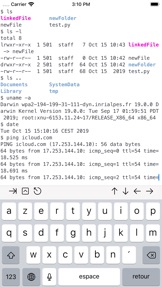
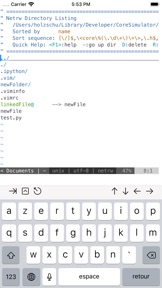
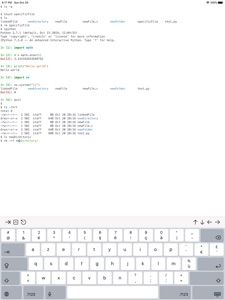
a-Shell is a complete local terminal emulator, allowing to run most Unix commands on you iOS device. You can transfer files using scp and curl, edit them with vim and ed, process them using grep, awk and sed.
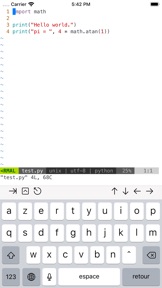
a-Shell includes Python, Lua, Perl, JavaScript, C, C++ for programming and TeX (texlive 2019, including LuaTeX) for text processing.
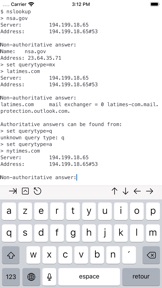
There are also multiple network utilities: nslookup, ping, whois, ifconfig... Type help for help, help -l to get the full list of commands.
a-Shell can be controlled from Shortcuts: run commands in order, process files in a-Shell, get the results as text or files, transfer files to other apps...
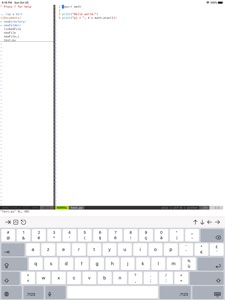
a-shell uses iOS 13+ “multiple windows” ability, so you can run multiple shells at the same time, with different commands, in different directories. You can edit a file in one window with vim and process it in the other with python.
Compile your C or C++ programs to webAssembly using clang or clang++, and execute the resulting binary. A complete webAssembly SDK is included (WASI-libc).
a-Shell is the complete version. If you need a smaller app, and you don't need a C compiler, a TeX engine, or numpy and matplotlib, there is a-Shell mini.

バージョン 1.7.3 の新機能

- commands like vim and less now use an alternate screen, reducing clutter in the terminal.
- new gesture recognition: slide laterally to move the cursor, vertically to scroll. In Vim and less, slide to move the cursor.
- new command: lg2, a git-like command based on libgit2. clone, pull, push, rebase... from inside a-Shell.
- pwd now shows the compact definition of the path (~/Documents). pwd -P shows the long version.
- new permanent bookmarks: ~iCloud and ~cloud for the iCloud "a-Shell" folder.

販売元

名前が

Nicolas Holzschuch

情報

カテゴリ

バージョン

1.7.3

サイズが

975.8 MB

Game Center

いいえ

VPP Device Licensing

はい

レート

以下の理由により 17+ のレーティングがついています。
無制限のWebアクセス

互換性

iOS 14.0 以降

デバイス

iPhone 5s, iPhone 6, iPhone 6 Plus, iPhone 6s, iPhone 6s Plus, iPhone SE, iPhone 7, iPhone 7 Plus, iPhone 8, iPhone 8 Plus, iPhone X, iPhone XR, iPhone XS, iPhone XS Max, iPhone 11, iPhone 11 Pro, iPhone 11 Pro Max, iPhone SE (第 2 世代), iPhone 12, iPhone 12 Pro, iPhone 12 Pro Max, iPhone 12 mini, iPad(第 5 世代) Wi-Fi, iPad(第 5 世代) Wi-Fi + Cellular, iPad(第 6 世代) Wi-Fi, iPad(第 6 世代) Wi-Fi + Cellular, iPad Pro, iPad Pro(Cellular), iPad Pro(9.7インチ), iPad Pro(9.7インチ)(Cellular), iPad Pro 12.9-inch (第 2 世代), iPad Pro 12.9-inch (第 2 世代) Wi-Fi + Cellular, iPad Pro (10.5-inch), iPad Pro (10.5-inch) Wi-Fi + Cellular, iPad Pro (11-inch), iPad Pro (11-inch) Wi-Fi + Cellular, iPad Pro 12.9-inch (第 3 世代), iPad Pro 12.9-inch (第 3 世代) Wi-Fi + Cellular, iPad Air, iPad Air(Cellular), iPad Air 2, iPad Air 2(Cellular), iPad Air(第 3 世代 ), iPad Air(第 3 世代 ) Wi-Fi + Cellular, iPad mini Retina, iPad mini Retina(Cellular), iPad mini 3, iPad mini 3(Cellular), iPad mini 4, iPad mini 4(Cellular), iPad mini(第 5 世代), iPad mini(第 5 世代) Wi-Fi + Cellular, iPad(第7世代) Wi-Fi + Cellular, iPad Pro 11 インチ (第 2 世代), iPad Pro 11 インチ (第 2 世代) Wi-Fi + Cellular, iPad Pro 12.9 インチ (第 4 世代), iPad Pro 12.9 インチ (第 4 世代) Wi-Fi + Cellular, iPad Air(第 4 世代)(Wi-Fi), iPad Air(第 4 世代)(Wi-Fi + Cellular), iPad(第8世代) Wi-Fi, iPad(第8世代) Wi-Fi + Cellular, iPad Pro 11 インチ (第 3 世代), iPad Pro 11 インチ (第 3 世代) Wi-Fi + Cellular, iPad Pro 12.9 インチ (第 5 世代), iPad Pro 12.9 インチ (第 5 世代) Wi-Fi + Cellular, iPod touch(第 6 世代 ), iPod touch(第7世代)

言語

英語

App Store: カスタマー評価

評価とレビュー

4.7/5 (45 つの評価)

App Store: カスタマーレビュー

2021-06-08

lack of binaries

look and feel is very nice,
but because it does not come with wget, git, bash, node, sudo / apt-get / yum (of course, won’t surprise), can’t really do much. Haven’t try to transfer all the binaries into it one by one, but it won’t be a smooth usage even though
ボッサー573
バージョン 1.7.2
2021-03-02

fatal error

"stddef.h" file not found
thank you
I was able to compile.
パンコー
バージョン 1.6.8
2021-02-24

携帯中で一番のshellと思う

めちゃすごいshellであるね、簡単ながら便利です!
谢立頓
バージョン 1.6.7
2020-06-07

起動しない

最初の頃は使えていたが途中から起動しなくなった。アップデートしてもダメ。
iPythonが使えるのはいい。WebAssemblyだけどclangでコンパイルしたc/c++のバイナリも動く。シェルコマンドも基本的なものは使えるがもう少し充実してくれるとありがたい。
At first I could launch this app on my phone , but since few days ago I can't. Updating didn't work.
Ma_lumine_123
バージョン 1.5.0
2020-03-23

個人的にまあまあかな。

2020年3月23日追記:
作者様からご返信があり(作者様、ご返信ありがとうございます!)、どうやら本アプリの開発者様が”OpenTerm”のシェル側の作者様のようで、ご心配の方は英語ですが作者様に直接聞いてみるのもありかなと思います。
(なお、pipが最新版へアップデートできないのとsixモジュールがアプリの再起動後インポートするとエラーを出すのは仕様の様です。)
以下過去レビュー:
pip本体のアップデートが再起動する度にリセットされたり再起動の度にsixモジュールを再インストールしないといけない以外は問題なさそう。
変な通信もなくごく普通のアプリの様です。
(Sixモジュールの対策方法としては再起動時に再インストールするしか今の所はなさそうです)
Dark7Seven
バージョン 1.1
2019-11-10

Vim 8 や Python 3.7、TeX Live 2019 が動く

Vim 8 や Python 3.7 がネイティブで動くため、pip でインストールした pyls や flake8 と連携して vim-lsp や ale と言ったプラグインを使うこともできる。iOS/iPadOS 向けの Vim アプリで Python や外部コマンドを使うようなプラグインを入れることができるアプリは現状このアプリが唯一です。iCloud Drive や Working Copy (git) などの外部アプリのディレクトリも開くことができるため、単純なテキストエディタとしても使いやすいです。
また、ネイティブの TeX Live 2019 では LuaTeX-ja が含まれているため、LuaTeX-ja のクラスを使っていれば何の問題もなく日本語文書がコンパイルできます。
その他多数の UNIX コマンドが同梱されており、今後の発展が楽しみなアプリです。
_kebo
バージョン 1.3