概要規約プライバシー連絡先
 
更新中
Break Speed

Break Speed

リリース: 2010-05-17
© 2020 Paul Nettle
Break Speed - QRコードは
バージョン 6.0.3
4+
App Storeからダウンロード
バージョン 6.0.3
4+
App Storeからダウンロード
リリース: 2010-05-17
© 2020 Paul Nettle

iPhone スクリーンショット

スクリーンショット
スクリーンショット
スクリーンショット
スクリーンショット
スクリーンショット

iPad スクリーンショット

スクリーンショット
スクリーンショット
スクリーンショット
スクリーンショット
スクリーンショット

説明

How Fast Is Your Break? Break Speed Powered By Predator can tell you!
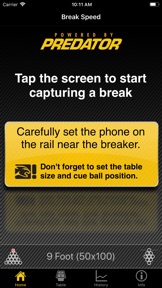
To use the app, set your phone on the rail and tap the screen. Now you're ready to break. Tap the screen once again after your break and the app will display your Break Speed speed.
Break Speed is more than 10x the accuracy of a radar gun and has become the standard for break shot speed measurements, privately and professionally. With such high precision, you can use Break Speed to provide that feedback you need to improve your breaks. Break harder and more consistently with Break Speed.
Don't worry about others breaking around you or other pool hall noise. Even shouting players won't fool our Break Recognition technology.
Find out why professional pool players are using and recommending Break Speed to others.
Our collaboration with Predator has been very effective. It's been great to work with a team that understands the science of billiards. The Predator R&D team has been testing the application along side their own speed measurement equipment and the Iron Willie robot, following a number of testing sessions, the Predator R&D team found the application so accurate that a partnership in pool science began.
"The application is really spot on. During my many testing sessions with the Predator Team there was very little deviation between the Predator testing equipment and the application," said Predator Pro Mike Dechaine.
If you're a serious player, and you don't have Break Speed Powered By Predator, what are you waiting for?

バージョン 6.0.3 の新機能

Fixed a crash on startup for devices running iOS 11.

販売元

名前が

Paul Nettle

情報

販売元

カテゴリ

バージョン

6.0.3

サイズが

15.2 MB

Game Center

いいえ

VPP Device Licensing

はい

レート

評価: 4+

互換性

iOS 9.0 以降

デバイス

iPhone 4S, iPhone 5, iPhone 5c, iPhone 5s, iPhone 6, iPhone 6 Plus, iPhone 6s, iPhone 6s Plus, iPhone SE, iPhone 7, iPhone 7 Plus, iPhone 8, iPhone 8 Plus, iPhone X, iPhone XR, iPhone XS, iPhone XS Max, iPhone 11, iPhone 11 Pro, iPhone 11 Pro Max, iPhone SE (第 2 世代), iPad 2 (Wi-Fi), iPad 2 (3G), iPad (3rd Generation) (Wi-Fi), iPad (3rd Generation) (4G), iPad(第 4 世代)(Wi-Fi), iPad(第 4 世代)(4G), iPad(第 5 世代) Wi-Fi, iPad(第 5 世代) Wi-Fi + Cellular, iPad(第 6 世代) Wi-Fi, iPad(第 6 世代) Wi-Fi + Cellular, iPad Pro, iPad Pro(Cellular), iPad Pro(9.7インチ), iPad Pro(9.7インチ)(Cellular), iPad Pro 12.9-inch (第 2 世代), iPad Pro 12.9-inch (第 2 世代) Wi-Fi + Cellular, iPad Pro (10.5-inch), iPad Pro (10.5-inch) Wi-Fi + Cellular, iPad Pro (11-inch), iPad Pro (11-inch) Wi-Fi + Cellular, iPad Pro 12.9-inch (第 3 世代), iPad Pro 12.9-inch (第 3 世代) Wi-Fi + Cellular, iPad Air, iPad Air(Cellular), iPad Air 2, iPad Air 2(Cellular), iPad Air(第 3 世代 ), iPad Air(第 3 世代 ) Wi-Fi + Cellular, iPad mini(Wi-Fi), iPad mini(4G), iPad mini Retina, iPad mini Retina(Cellular), iPad mini 3, iPad mini 3(Cellular), iPad mini 4, iPad mini 4(Cellular), iPad mini(第 5 世代), iPad mini(第 5 世代) Wi-Fi + Cellular, iPad(第7世代) Wi-Fi + Cellular, iPad Pro 11 インチ (第 2 世代), iPad Pro 11 インチ (第 2 世代) Wi-Fi + Cellular, iPad Pro 12.9 インチ (第 4 世代), iPad Pro 12.9 インチ (第 4 世代) Wi-Fi + Cellular, iPod touch(第 5 世代 ), iPod touch(第 6 世代 ), iPod touch(第7世代)

言語

英語, 中国語

App Store: カスタマー評価

評価とレビュー

3.0/5 (5 つの評価)

App Store: カスタマーレビュー

2019-07-21

言語

中国語で表示されて意味がわかりません。
せめて英語の表示にしたいのに、どこで変更できるのかが不明です。
誰かわかる人いたら、教えて下さい。
お願いします。
ヤゴラム
バージョン 5.5.2
2019-03-20

んー

周りの関係ない音拾いまくってるのか、まともに計測出来ないです。
球オタク
バージョン 5.5.2
2012-02-04

面白い

Km表示にするとヒストリーの数値がおかしくなる(ブレイク後の表示自体は正常)バグはありますが、それ以外は安定しています(4S) このバグが直れば星5です。
精度もかなり高いと思います。店内に音楽が流れ隣の台で人が撞いてる状況でもきっちり計測してくれます。平均して1Kmアップさせるのがこんなに大変な事だとは思わなかった。ブレイクの練習は元々好きだけどより一層楽しく練習出来るようになりました。
Tos588
バージョン 3.0.0
2010-11-09

精度、使い勝手がよい!

音で速度計算するので、ブレイク位置だけ合わせるだけなんですね!
後はiPhoneを適当に置いてタップするだけ。
非常に精度が良く、驚きました!
Paramenber
2010-09-27

interesting

but i wish I could look back on history and record the name of the player for that certain break shot..maybe calculating average is cool too. But the idea is cool and I enjoy using it. Only complain is that it was bit expensive for what it can do....
るいこすた
2010-09-25

iPhone4

9月24日にアップロードしたら起動しなくなった…
ビリ狂
2010-09-25

起動しなくなった

バージョンアップしたら起動しなくなった。
iPhone 3GS iOS4.1
iOSバージョンを間違えていたので訂正
緑風
2010-09-24

全く起動しませんが・・・

どーなってんの??
エロミ
2010-09-09

使ってみると楽しい。精度も向上しました。

It was possible to use it also with iPhone4 for me.
I hope to be able to display Km.
マイル表示以外にkm表示が出来たら良いと思う。また、履歴を残せるともっとよいと思います。
私の環境ではiPhone4で正常に動作しています。
---------
以前は、マイル表示をkmに計算していましたが、
バージョン1.5でkmでの表示がサポートされ使いやすくなりました。
また、計測の精度も上がったように感じます。
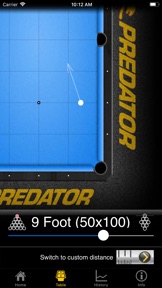
このソフトはブレイクした瞬間の音と手玉が1番に当たった瞬間の音を認識し
その時間差と距離で速度を算出しています。
周囲の雑音がある場所でも正確に手玉が当たった瞬間の音を認識出来るようになりました。
onetake only
2010-08-26

指標に使えて楽しい!

km対応もナイス!
あがたも
2010-06-17

これはおもしろい。

何度か試しましたが、ほぼ同じ数字を表示するので、正確なのではないでしょうか?!KM表示や、過去のアベージ機能とかあると良いかな。なので★4つ。おまけに700円はちょっと高いかな…。ただ、練習の目安にもなるし、とても使えるアプリだと思います。
ミツ目