更新中


-3
32位 ─ トップ有料 App > グラフィック/デザイン
-5
14位 ─ トップ有料 iPad App > グラフィック/デザイン
-21
57位 ─ トップセールス iPad App > グラフィック/デザイン
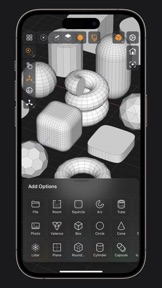
iPhone スクリーンショット




iPad スクリーンショット


説明
Valence 3D is a new powerful, beautiful & easy-to-use 3D modeler & design tool built from the ground up for iPad & iPhone. No matter whether you're learning 3D modeling for the first time or a professional working in design, construction, gaming, web dev, digital fabrication, architecture, or spatial computing, Valence 3D has what you need to get started!
CREATE, IMPORT, EDIT & EXPORT 3D MODELS
• 25 primitive shapes are built-in & ready to help you start modeling: plane, box, sphere, squircle, rounded box, arc, circle, cylinder, tube, cone, capsule, torus, icosphere, pipe, revolve, helix, voronoi, text, super shape, noise surfaces, torus knot, faceted gem & tube.
• Import existing models, reference images, lidar scans and room plans
• Imports: OBJ, STL, USD, USDZ
• Exports: PNG, SVG, OBJ, STL, USD, USDZ, GLTF, GLB
• Knife tool to create complex and detailed geometry
• Move, Rotate, & Scale gizmos make it easy to transform nodes, faces, edges & vertices
• Powerful modeling gizmos for extruding, insetting, beveling, poking, creasing & cutting
• Multiple selection & automatic loop selection help accelerate your modeling
• Tap on one of the gizmo handles to bring up an input field for precise transformations & mesh operations
• Robust snapping & alignment commands
• Selection operations: grow, shrink, select shell & deselect
• Mesh operations: duplicate, instance, set / center pivot, trim by plane, boolean, apply transform & subdivide
• Face operations: separate, combine, bridge, extract, poke, collapse, delete, dissolve, harden & soften
• Edge operations: extrude, insert vertex, collapse, dissolve, bridge, harden & soften
• Vertex operations: insert edge, dissolve, delete & merge
• Non-destructive & configurable mesh modifiers: mirror & subdivision
• Apply complex transformations using different gizmo pivot points & orientations
EASILY NAVIGATE & STAY IN FLOW WHILE DESIGNING
• Carefully crafted & fully optimized for iPhone & iPad
• Designed to minimize cognitive overload by only showing tools & commands that are contextually relevant
• Easily navigate to any part of your model by dragging and pinching: two finger pinch to zoom and roll, and one finger drag to rotate
• Pop into the standard orthographic views by tapping one of the handles of the orientation gizmo
• Use two & three finger tap gestures to undo & redo
• Select components by dragging or using the rectangular selection mode
• Your work is saved automatically every two minutes and every time you go back to the gallery
• Get an overview of your scene’s structure from the Outliner
• Long press on a node in the Outliner to easily rename, duplicate, instance, delete, parent & reorder any object in your scene
• Precisely adjust any node’s position, rotation & scale with the Inspector
• Adjust material properties, display & modifier options with the Inspector
STAY ORGANIZED ACROSS ALL YOUR DEVICES
• Preview, share, duplicate, delete & rename your models from the gallery
• iCloud syncing keeps all your models up to date, private & accessible across all your devices
PREVIEW, MEASURE, & RENDER YOUR CREATIONS
• 6 powerful rendering modes: Matcap, Modeling, Wireframe, Physically Based, X-Ray & Path Traced
• Export renders in any aspect ratio & scale
• Preview your model in AR in two taps
• Export your scene as a USDZ & be confident it’ll look consistent on all Apple devices
• Tweak your model’s material & see changes in real-time
• Tweak-able scene settings: camera field of view, background type, blurriness, intensity & rotation
• Get model measurements in one click
• Add persistent dimensions between any two surfaces in your scene
PURCHASE & COMPATIBILITY
• One time purchase unlocks both iPhone & iPad versions
• Apple Pencil supported on select iPads
• 120 FPS supported on devices with ProMotion displays
• Path Tracing is supported on iPads with M series chips & iPhones with A15 Bionic & later
• Lidar Scan & Room Plan is supported on devices with a lidar sensor
バージョン 1.3.9 の新機能
Minor bug fix.
販売元
名前が
Hi-Rez, Inc
情報
販売元
カテゴリ
バージョン
1.3.9
サイズが
203 MB
Game Center
いいえ
VPP Device Licensing
はい
レート
評価: 4+
互換性
iOS 18.0 以降
デバイス
iPhone 5s, iPhone 6, iPhone 6 Plus, iPhone 6s, iPhone 6s Plus, iPhone SE, iPhone 7, iPhone 7 Plus, iPhone 8, iPhone 8 Plus, iPhone X, iPhone XR, iPhone XS, iPhone XS Max, iPhone 11, iPhone 11 Pro, iPhone 11 Pro Max, iPhone SE (第 2 世代), iPhone 12, iPhone 12 Pro, iPhone 12 Pro Max, iPhone 12 mini, iPhone 13, iPhone 13 Pro, iPhone 13 Pro Max, iPhone 13 mini, iPhone SE (第 3 世代), iPhone 14, iPhone 14 Plus, iPhone 14 Pro, iPhone 14 Pro Max, iPhone 15, iPhone 15 Plus, iPhone 15 Pro, iPhone 15 Pro Max, iPhone 16, iPhone 16 Plus, iPhone 16 Pro, iPhone 16 Pro Max, iPhone 16e, iPhone 17, iPhone 17 Pro, iPhone 17 Pro Max, iPhone Air, iPhone 17e, iPad(第 5 世代) Wi-Fi, iPad(第 5 世代) Wi-Fi + Cellular, iPad(第 6 世代) Wi-Fi, iPad(第 6 世代) Wi-Fi + Cellular, iPad Pro, iPad Pro(Cellular), iPad Pro(9.7インチ), iPad Pro(9.7インチ)(Cellular), iPad Pro 12.9-inch (第 2 世代), iPad Pro 12.9-inch (第 2 世代) Wi-Fi + Cellular, iPad Pro (10.5-inch), iPad Pro (10.5-inch) Wi-Fi + Cellular, iPad Pro (11-inch), iPad Pro (11-inch) Wi-Fi + Cellular, iPad Pro 12.9-inch (第 3 世代), iPad Pro 12.9-inch (第 3 世代) Wi-Fi + Cellular, iPad Air, iPad Air(Cellular), iPad Air 2, iPad Air 2(Cellular), iPad Air(第 3 世代 ), iPad Air(第 3 世代 ) Wi-Fi + Cellular, iPad mini Retina, iPad mini Retina(Cellular), iPad mini 3, iPad mini 3(Cellular), iPad mini 4, iPad mini 4(Cellular), iPad mini(第 5 世代), iPad mini(第 5 世代) Wi-Fi + Cellular, iPad(第7世代) Wi-Fi + Cellular, iPad Pro 11 インチ (第 2 世代), iPad Pro 11 インチ (第 2 世代) Wi-Fi + Cellular, iPad Pro 12.9 インチ (第 4 世代), iPad Pro 12.9 インチ (第 4 世代) Wi-Fi + Cellular, iPad Air(第 4 世代)(Wi-Fi), iPad Air(第 4 世代)(Wi-Fi + Cellular), iPad(第8世代) Wi-Fi, iPad(第8世代) Wi-Fi + Cellular, iPad Pro 11 インチ (第 3 世代), iPad Pro 11 インチ (第 3 世代) Wi-Fi + Cellular, iPad Pro 12.9 インチ (第 5 世代), iPad Pro 12.9 インチ (第 5 世代) Wi-Fi + Cellular, iPad(第 9 世代), iPad(第 9 世代) Wi-Fi + Cellular, iPad mini(第 6 世代), iPad mini(第 6 世代) Wi-Fi + Cellular, iPad Air (第 5 世代), iPad Air (第 5 世代) Wi-Fi + Cellular, iPad Pro 11 インチ (第 4 世代), iPad Pro 11 インチ (第 4 世代) Wi-Fi + Cellular, iPad Pro 12.9インチ (第6世代), iPad Pro 12.9インチ (第6世代) Wi-Fi + Cellular, iPad (第10世代), iPad (第10世代) Wi-Fi + Cellular, 11インチiPad Air (M2) Wi-Fi, 13インチiPad Air (M2) Wi-Fi, 13インチiPad Air (M2) Wi-Fi + Cellular, 11インチiPad Pro (M4) Wi-Fi, 11インチiPad Pro (M4) Wi-Fi + Cellular, 13インチiPad Pro (M4) Wi-Fi, 13インチiPad Pro (M4) Wi-Fi + Cellular, iPad mini(A17 Pro)Wi-Fi, iPad mini(A17 Pro)Wi-Fi + Cellular, iPad (A16) Wi-Fi, iPad (A16) Wi-Fi + Cellular, iPad Air 11インチ(M3)Wi-Fi, iPad Air 11インチ(M3)Wi-Fi + Cellular, iPad Air 13インチ(M3)Wi-Fi, iPad Air 13インチ(M3)Wi-Fi + Cellular, 11インチiPad Pro (M5) Wi-Fi, 11インチiPad Pro (M5) Wi-Fi + Cellular, 13インチiPad Pro (M5) Wi-Fi, 13インチiPad Pro (M5) Wi-Fi + Cellular, iPad Air 11インチ(M4)Wi-Fi, iPad Air 11インチ(M4)Wi-Fi + Cellular, iPad Air 13インチ(M4)Wi-Fi, iPad Air 13インチ(M4)Wi-Fi + Cellular, iPod touch(第 6 世代 ), iPod touch(第7世代)
言語
日本語, イタリア語, スウェーデン語, スペイン語, デンマーク語, ドイツ語, フランス語, ポルトガル語, ロシア語, 英語, 韓国語, 中国語
App Store: カスタマー評価
評価とレビュー
4.0/5 (46 つの評価)
App Store: カスタマーレビュー
入力なし