概要規約プライバシー連絡先
 
更新中
1Writer - Markdown Text Editor

1Writer - Markdown Text Editor

リリース: 2013-08-14
© 2025 Ngoc Luu
1Writer - Markdown Text Editor - QRコードは
バージョン 3.3.8
17+
App Storeからダウンロード
バージョン 3.3.8
17+
App Storeからダウンロード
リリース: 2013-08-14
© 2025 Ngoc Luu

iPhone スクリーンショット

スクリーンショット
スクリーンショット
スクリーンショット
スクリーンショット
スクリーンショット
スクリーンショット
スクリーンショット
スクリーンショット
スクリーンショット

iPad スクリーンショット

スクリーンショット
スクリーンショット
スクリーンショット
スクリーンショット
スクリーンショット
スクリーンショット
スクリーンショット
スクリーンショット
スクリーンショット

説明

1Writer combines all the basic text editing features you would expect with all the advanced features you will ever need. Use 1Writer to write, research, revise, and share your ideas with maximum efficiency.
- - - - - - - - - -
"The only Dropbox- and Markdown-enabled text editor for iPhone that’s clicked with me has been 1Writer. It’s simple, looks great, and gets the job done." - TheSweetSetup.com
"Really great app, really recommend it." - Federico Viticci, MacStories.net
"The app interface is beautiful and distraction-free, with loads of other awesome features lurking beneath its simple exterior. It's now my go-to iPhone text editor." - Chris Gonzales, ToolsandToys.net
"For users that want a great visual experience paired with great support for custom actions and third party apps, 1Writer is an excellent choice." - iMore.com
"1Writer is the most powerful text editor available for iPhone." - Phillip Gruneich
- - - - - - - - - -
CREATE
- Write :: generate and edit plain text or Markdown files.
- Preview :: see the formatted results with Markdown syntax highlighting while you write and a full, rich-text preview when you're done.
- Extended keyboard :: a convenient row of buttons for navigation, formatting, special characters (customizable--pick the characters you use the most).
- Insert photo :: pick a photo or take a new one, and 1Writer will upload it to Dropbox and generate the Markdown-syntax to add it to your document--all in a single action!
- Snippets :: TextExpander Touch support.
- Custom URL actions :: insert a document template, encode a selection and replace the original text, look up synonyms and much more.
- JavaScript :: create even more powerful custom actions using JavaScript—text manipulation, perform a find & replace, interact with the clipboard—the possibilities are endless.
IMPORT
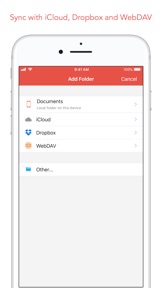
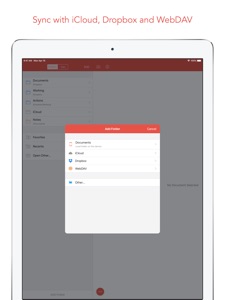
- Sync with iCloud, Dropbox and WebDAV.
- Share extension :: send text to 1Writer from other apps. In Safari, the extension uses the current URL, page title and selected text to create a new document.
- Create, append, prepend, or replace text directly from other apps using the 1Writer URL scheme.
EXPORT
- CloudApp and Dropbox :: generate a link to share your document in plain text or PDF.
- Evernote :: pick your notebook, add tags and turn a text selection or the entire document into a new, rich-text note.
- Copy HTML :: put the formatted text for your document directly on the clipboard.
- Custom actions :: open a web search, tweet a selection, save a series of items in a list and much more.
PERSONALIZE
- Support Dark Mode on iOS 13.
- 2 dark themes for more comfortable reading and writing at night.
- Choose from 20 different fonts.
- Bookmark and sync the Dropbox/WebDAV folders you want to have quick access to the sub-folders and documents you need.
- Use a passcode or Touch ID/Face ID to protect the app from unauthorized users.
RESEARCH
- In-app web browser :: research, look up information without having to leave the app.
- Bookmarks :: create and access your favorite websites.
- Save the current text selection to the clipboard in Markdown syntax.
- 1Password support :: login to all your accounts using the 1Password extension.
EVEN MORE GREAT FEATURES
- Drag and drop.
- Open in Place.
- Multiple windows on iOS 13.
- MultiMarkdown.
- Search documents from Spotlight.
- Find & replace within document.
- Photo and PDF preview.
- Today widget :: access your recent documents from the Notification Center or create a new document in one tap.
- Checklist support :: create a list of things to do or topics to research, and easily check them off.
- Full-text search and hashtag support :: search within a folder to find the document you need, and view related documents that have the same tag.

バージョン 3.3.8 の新機能

Bug fixes.

販売元

名前が

Ngoc Luu

URL

情報

販売元

カテゴリ

バージョン

3.3.8

サイズが

19.7 MB

Game Center

いいえ

VPP Device Licensing

はい

レート

以下の理由により 17+ のレーティングがついています。
無制限のWebアクセス

互換性

iOS 13.0 以降

デバイス

iPhone 5s, iPhone 6, iPhone 6 Plus, iPhone 6s, iPhone 6s Plus, iPhone SE, iPhone 7, iPhone 7 Plus, iPhone 8, iPhone 8 Plus, iPhone X, iPhone XR, iPhone XS, iPhone XS Max, iPhone 11, iPhone 11 Pro, iPhone 11 Pro Max, iPhone SE (第 2 世代), iPhone 12, iPhone 12 Pro, iPhone 12 Pro Max, iPhone 12 mini, iPhone 13, iPhone 13 Pro, iPhone 13 Pro Max, iPhone 13 mini, iPhone SE (第 3 世代), iPhone 14, iPhone 14 Plus, iPhone 14 Pro, iPhone 14 Pro Max, iPhone 15, iPhone 15 Plus, iPhone 15 Pro, iPhone 15 Pro Max, iPhone 16, iPhone 16 Plus, iPhone 16 Pro, iPhone 16 Pro Max, iPhone 16e, iPhone 17, iPhone 17 Pro, iPhone 17 Pro Max, iPhone Air, iPhone 17e, iPad(第 5 世代) Wi-Fi, iPad(第 5 世代) Wi-Fi + Cellular, iPad(第 6 世代) Wi-Fi, iPad(第 6 世代) Wi-Fi + Cellular, iPad Pro, iPad Pro(Cellular), iPad Pro(9.7インチ), iPad Pro(9.7インチ)(Cellular), iPad Pro 12.9-inch (第 2 世代), iPad Pro 12.9-inch (第 2 世代) Wi-Fi + Cellular, iPad Pro (10.5-inch), iPad Pro (10.5-inch) Wi-Fi + Cellular, iPad Pro (11-inch), iPad Pro (11-inch) Wi-Fi + Cellular, iPad Pro 12.9-inch (第 3 世代), iPad Pro 12.9-inch (第 3 世代) Wi-Fi + Cellular, iPad Air, iPad Air(Cellular), iPad Air 2, iPad Air 2(Cellular), iPad Air(第 3 世代 ), iPad Air(第 3 世代 ) Wi-Fi + Cellular, iPad mini Retina, iPad mini Retina(Cellular), iPad mini 3, iPad mini 3(Cellular), iPad mini 4, iPad mini 4(Cellular), iPad mini(第 5 世代), iPad mini(第 5 世代) Wi-Fi + Cellular, iPad(第7世代) Wi-Fi + Cellular, iPad Pro 11 インチ (第 2 世代), iPad Pro 11 インチ (第 2 世代) Wi-Fi + Cellular, iPad Pro 12.9 インチ (第 4 世代), iPad Pro 12.9 インチ (第 4 世代) Wi-Fi + Cellular, iPad Air(第 4 世代)(Wi-Fi), iPad Air(第 4 世代)(Wi-Fi + Cellular), iPad(第8世代) Wi-Fi, iPad(第8世代) Wi-Fi + Cellular, iPad Pro 11 インチ (第 3 世代), iPad Pro 11 インチ (第 3 世代) Wi-Fi + Cellular, iPad Pro 12.9 インチ (第 5 世代), iPad Pro 12.9 インチ (第 5 世代) Wi-Fi + Cellular, iPad(第 9 世代), iPad(第 9 世代) Wi-Fi + Cellular, iPad mini(第 6 世代), iPad mini(第 6 世代) Wi-Fi + Cellular, iPad Air (第 5 世代), iPad Air (第 5 世代) Wi-Fi + Cellular, iPad Pro 11 インチ (第 4 世代), iPad Pro 11 インチ (第 4 世代) Wi-Fi + Cellular, iPad Pro 12.9インチ (第6世代), iPad Pro 12.9インチ (第6世代) Wi-Fi + Cellular, iPad (第10世代), iPad (第10世代) Wi-Fi + Cellular, 11インチiPad Air (M2) Wi-Fi, 13インチiPad Air (M2) Wi-Fi, 13インチiPad Air (M2) Wi-Fi + Cellular, 11インチiPad Pro (M4) Wi-Fi, 11インチiPad Pro (M4) Wi-Fi + Cellular, 13インチiPad Pro (M4) Wi-Fi, 13インチiPad Pro (M4) Wi-Fi + Cellular, iPad mini(A17 Pro)Wi-Fi, iPad mini(A17 Pro)Wi-Fi + Cellular, iPad (A16) Wi-Fi, iPad (A16) Wi-Fi + Cellular, iPad Air 11インチ(M3)Wi-Fi, iPad Air 11インチ(M3)Wi-Fi + Cellular, iPad Air 13インチ(M3)Wi-Fi, iPad Air 13インチ(M3)Wi-Fi + Cellular, 11インチiPad Pro (M5) Wi-Fi, 11インチiPad Pro (M5) Wi-Fi + Cellular, 13インチiPad Pro (M5) Wi-Fi, 13インチiPad Pro (M5) Wi-Fi + Cellular, iPad Air11M4, iPad Air11M4Cellular, iPad Air13M4, iPad Air13M4Cellular, iPod touch(第 6 世代 ), iPod touch(第7世代)

言語

日本語, ドイツ語, 英語, 中国語

App Store: カスタマー評価

評価とレビュー

4.5/5 (74 つの評価)

App Store: カスタマーレビュー

2026-03-24

Dropboxが読み込めなくなった

iPad miniにてDropboxフォルダが開かなくなりました。フォルダの作り直しを試みたら、削除後は読込中のまま、さいせっていができません。アプリもOSも最新、端末再起動も効果なし。愛用していたので残念。
poropororo
バージョン 3.3.8
2026-01-04

ゴミアプリ

文書幅すら設定出来ない
バグってもっと細くなる時ある
金返せカス
あーあ、、、
バージョン 3.3.6
2025-10-05

DoropBox連携ではこれが最高

数多の有料テキストエディタを試し続けてたどり着いた唯一のエディタです。同期速度も堅牢性も他の追随を許しません。本当に継続していって欲しい。
ZODIAC@zoe
バージョン 2.2.2
2025-07-06

すばらしい

Dropboxでフォルダ共有して、パソコンとスマホと両方で書きます。
驚くほどシームレスで、使えます。履歴管理がしたい人は大変かもですが快適です。
jomon-dokusyo
バージョン 2.9.2
2025-03-26

自分の用途だととても便利

Dropboxで同期させているテキストファイルをまとめたディレクトリを、iPhoneではこのアプリで、MacではVSCodeで読み書きしています。1年以上は同じ環境で利用しており、とても満足しています。そのディレクトリはgit管理しています。--separate-git-dirオプションを使うと.gitをDropbox同期の外に置けます。.gitが同期されることもありません。
sttaf34
バージョン 2.0
2025-01-19

Textforceの代替として

これまでiphone上ではTextforceを使い、PCでは紙copiを使って、Dropboxで同期させ、日常から仕事まであらゆるメモを管理してきました。それが、iphoneを買い替えたところ、Textforceが使えない!青くなって代替アプリを探して1Writerに辿り着きました。使ってみたところ、使い方はシンプル、非常に動作は軽快で、文字化けも発生せず、Textforceでできたことはほぼ完全に代用可能でした。強力な検索機能も有しており、Textforce以上に使いやすいかと感じています。長く使えるアプリになりそうです。
タラバイモ
バージョン 3.1
2025-01-15

折り畳みができない?

動きは軽快で好感度高かった。
でももしかして折り畳みができないのかな? だとしたら、ちょっと使えないなぁ。。
早まって買ってしまったか…
とおこおしゃ
バージョン 3.0.4
2024-05-06

便利で使いやすい

iPhoneでDropbox内のマークダウンファイルを編集、プレビューするにはこれで決まり。
・操作性が良い 分かりやすい
・Dropboxのファイルにアクセスでき、PCと上手く連動して使える
SS_Jack
バージョン 3.3
2023-04-29

ミニマリスト

作業時の画面がこれ以上にシンプルなテキストエディタは他にない。書いているものに集中できるので愛用している。
Mari_Tredda
バージョン 3.3.8
2023-04-09

Dropboxと同期、プレーンテキストという強み

標準的なmarkdown対応エディタですが、Dropboxに対応しファイルは標準的なテキストファイルとして扱われるのが素晴らしい。
他のアプリは独自のファイル形式で管理するものがほとんどで、他のアプリを使うときに困る上、他に移行するときに大変苦労します。
また、フォントを自由に設定できるのも素晴らしい。
Dropboxへの同期が若干遅いのが惜しい。
また、Apple Siliconのmacでも動作しますが、キーボードショートカットが使えないので、ぜひフル対応してほしいです。
かるる
バージョン 1.4.4
2022-08-10

一点を除いて完璧なエディタ

Markdown/txtを編集するのに完璧なエディタです。
日本語入力の扱いもまったく問題ありません。
ただ、アイコンがダサいです…。問題点は本当にこれだけです。
犬の手下
バージョン 3.0.2
2021-06-14

widget

i want a widget for ios14. I want to put the widget on the home screen not the side bar thing.
sssuper51234
バージョン 2.5.6
2021-04-10

落ちます

新規作成,既存ファイルの編集とも,すぐに落ちて何もできない
yhn00246
バージョン 2.2.1
2021-03-15

Dance on Apple M1 Mac

Very Thanks to support Apple M1 Mac.
BattleHawk
バージョン 2.1
2020-10-09

Good, but i want ‘outline’ panel

I’m using this for typing texts(.txt) on iPad, syncing with Dropbox files. Great markdown function, great syncing, great UI etc.
I hope this app can display an ‘outline’ panel based on headings of markdown, like other editors; and when clicking on a heading, the display goes on to show the section concerned.
Japanese: iPadで外出時に使用するために、マークダウンできて、Dropboxと同期できるアプリを探して、このアプリにたどり着きました。機能に不満はなく、見た目も美しく、ブラックモードもあるので、目を痛めずに済むと思います。もちろん、PCのエディタとは違うので、マークダウンの表示を色やフォントをいじることはできなかったり拡張性は少ないと思いますが、このままで十分かなと思っています。
個人的には、マークダウンした見出しに合わせて、アウトライン・目次を確認できるようにしてほしいなと思います。今後の改良も望んで星4つです。
アーベーセーdayo
バージョン 2.9.4
2020-09-13

良い

Dropboxと同期させたフォルダにObsidianのVaultを作成して1Writerから編集・閲覧してます。
一見まとまりのない知見をノード単位で管理できるObsidianのようなアプリケーションと組み合わせるとこのアプリは重宝しますね。
John Doe 太郎
バージョン 3.3.1
2020-07-31

GreatApp for vimwiki !!

- Dropbox sync
- Inline preview
- Can use local link
Its a perfect!! thanks!
ぽたぽたやき
バージョン 3.0
2020-05-13

ここに辿りついた

必要な機能があり、書くことに集中できるメモアプリをずっと探し続けていて、たどり着いたのがこのアプリです。
モーニングノートやアイディアのドラフト、noteの下書きなど、およそ簡易的なメモであればこのアプリが最高です。
kyd_a
バージョン 3.3.5
2019-10-22

good, but

I want file lists to be displayed in the left part of the screen while typing texts because my ideas and so on are stored in separate files to avoid a mess.
mossramparts
バージョン 2.8.6
2019-09-19

最高

すごく軽く動いて、マークダウンがいい感じでダークモードもあり、とても重宝してます。
swFrfhujQlop
2019-06-16

日本語キーボードだと重複入力される

iPhoneXS,iOS 12.3.1ですが、日本語キーボードだと、iOS、ATOKとも、入力した際、同じ文字が2回入力されます。削除も2回入力されてしまいます。。
3110kzms
2019-03-24

軽量で使いやすく、何よりシンプルなUIが素晴らしい。

日本だとレビューが少なく迷っていましたが、買って大正解です。
Draftsなどに比べて機能が必要十分でシンプルに抑えられているのでとても使いやすい。UIが美しくどんどん書きたくなるアプリです。
英語圏だとレビューも多く高評価ですので、もっと日本で評価されることを願います!
Unagiy
2019-03-22

素晴らしい!

Bywordのガバガバ解析精度に嫌気が刺したので乗り換え。
結論から言いますと、もっと早くこちらを使うべきだったと思っています。
シンプルで使いやすく、それでいて、かゆい部分をきちんとカバーしています。
何より、拡張キーボードの自由度の高さがすごいです。
最近になって拡張キーボードのカスタムができるようになり、そこへJavaScriptアクションを登録しておけるようになりました。
この機能がとても優秀。JavaScriptを使う事で、より細かい挙動の制御が可能になっています。
文字の挿入やカーソル・選択位置の移動、アラートや入力フォームなどのUI、ブラウザにhttpなど… テキストエディタとしてはオーバースペックなくらいです。
十分に満足していますが、いくつか要望を。
・左スワイプで(ブラウザではなく)プレビューを表示させるオプションの追加
・拡張キーボードの設定画面から直接アクションを追加・編集できるようにして欲しい
# Request!
* Add option of `show markdown preview (not built-in browser) by left swipe`.
* `Add (edit) action` on a screen of the extra keyboard settings.
trackiss
2018-11-22

Excellent app

Far better DropBox Sync than Ulysses
Hope you can support OneDrive sometime
Never considered subscription?
nutnutwin
2018-09-30

Please improve the multiline Code Block feature using three backquotes

GOOD.
I want you to improve the following feature.
I use usually the feature ’Code Block’ using three backquotes(```).
But it seems like that your app supports the wrap line in Code Block.
As of now, your app can support single-line block, but can not support multi-line block.
Please improve the multiline Code Block feature using three backquotes.
バナナ&苺&アップル
2017-09-06

markdownでtodoリスト作成

使い勝手が良いです
まろんa
2017-01-04

最高

色々試したけど結局帰ってきた。
Google Drive にも対応して欲しい!
giantswing
2016-11-06

NebulousNoteとの比較

このアプリの良い点
・編集モードと閲覧モードの切り分けが可能で、単にテキストを参照したい時にはとても便利(しかも標準が閲覧モードなので、画面を誤タップ→キーボード起動→キーボード収納という煩わしい事も起こらない)。
・アクション(マクロ)にJavaScriptが使えるなど、拡張機能の拡張性が非常に高い。
・標準で日本語に対応しているので、取っつきやすい。
・dropboxに対応している。
このアプリの良くない点
・拡張キーボードのカスタマイズが出来ない。
・検索機能が「アクション」にしか無く、しかも追加が必要(操作は簡単だが、英語サイト)。
(ちなみに、NebulousNoteは拡張キーボード自体に拡張性を持たせてあり、簡単ながらマクロ的機能を有する)
・値段が600円と少々高め。
Folth
2016-07-01

たどり着いた

速い、使いやすい、明快。osx版も作ってほしい。
わかめ村長
2016-03-30

最高

cool
saikyousann
2015-11-10

この手のエディタ系でトップクラス

同期は安定してるし、シンプルかつかゆいところに手が届いてる。Dropbox等を階層ごと管理できるのでMacなどと連携してる人に是非おすすめしたい。
沼川
2015-11-02

とても良い

使いやすい。
編集を開始するときタップした位置にカーソルが配置されるともっと良い。
現在はタップした位置より2行くらい上の位置にカーソルが配置されてしまうことがある。
yasuk71
2015-08-30

使いやすい!

使いやすく重宝しています!
フォルダ名の変更などができれば嬉しかったのですが、それを差し引いても最高です。
Jonny35
2015-04-08

気に入っています!

ブログ下書き投稿やDayOne投稿、メモなどに利用しています。
決め手はDropbox同期とアプリ内ブラウザ、融通のきくアクション、拡張キーです。
アクションは1Writer投稿ページや他アプリ用のアクションをカスタマイズしてます。
安定してて、Dropbox同期エラーが発生してもデフォルト設定したフォルダに
直前まで作業してたファイルを複製できるので安心して使えます。
日本語化してるので使いやすいです。
願望としては、デフォルトキーボードを分割してる時は拡張キーが反応しないので、
分割してる時でも拡張キーが使いたいです。
縦でiPad miniで使っているとカスタマイズできる拡張キーは8個しかないのですが、
アクション呼び出しキー以外は全部カスタマイズしたいです。
外部からアクションを起動できるスキームがあったらいいなと思います。
I want to use extension keys, even when default keyboard splits.
Because I use vertical iPad mini, extension keys can be customized are only eight.
I'd like to customize the extension keys all, other than the action call keys.
If 1Writer can run Action by scheme, that will please me.
akimsm
2015-02-27

こういうの探してました

保存先をDropBoxにしてMacではnvalt、iPhoneでは1Writerといった具合に、クラウドメモとして使っています。Markdownの編集、閲覧が出来るのでちょっとしたマニュアルづくりにも重宝しています。Evernoteはスペースや改行をなにかの拍子に置き換える事があるので自分の用途では使い物になりません。操作も快適です。
obi4321
2014-11-28

Markdownも使える多機能なエディタ

反応も速く、安定している。日本語も問題ない。Dropboxのフォルダをデフォルトにすれば、OSやデバイスを問わないテキスト共有環境がつくれる。
手抜きなアイコンを何とかして欲しい。もったいない。
motoe m
2014-09-05

ちょういい!

今の機能で大体満足です!すごい良い!日本製ではあり得ない!
定期的にバージョンアップしてくれるところも信頼がおけますね!
そるふぃ