説明
Project Management with natural gestures on the Gantt chart, designed for the small touchscreens. Synchronizing projects across multiple devices and sharing projects across teams AND supports Microsoft Project Plan integration.
* BUSINESS SECURITY:
User-generated projects are stored at the user's discretion on the device or the iCloud Drive of the users.
* Feature video https://youtu.be/Ean-OpZkhEQ
* No in-app purchases
* QuickPlan is being enhanced continuously.
* QuickPlan is now available for the macOS, at https://itunes.apple.com/app/id1071586133 (download 15 days of the free trial from https://quickplan.app/trial, and try all the features before buying).
QuickPlan makes project scheduling super more comfortable than ever. NATURAL GESTUREs and keyboard shortcuts use on a clean, and smooth user interface makes project maintenance more accessible, faster, and more efficient than ever before. Visualize, maintain and simplify projects on Gantt charts, lay out tasks, arrange your project calendar and resources, track task status - it's easier than you think, all at your fingertips with a minimum of effort and learning.
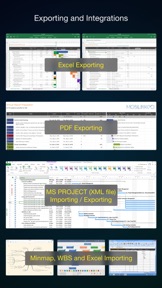
QuickPlan supports to export projects to Image, Excel, PDF, Microsoft Project, WBS files, AND to import projects from Microsoft Project (in XML format), WBS, Mindmap, and Excel files. Plans can be synchronized across multiple devices via iCloud Drive. They can be shared across teams and devices via AirDrop, Email, and iOS Files app.
QuickPlan fine-tunes the best features of Microsoft Project Plan and re-purposes them for the iPhone - without the complexity. We are bringing INTUITIVE and discoverable project maintenance to users of all experience levels.
## EFFICIENT MAINTENANCE
· Nature gestures to lay out the task, change outline level, sequence, zoom, collapse, expand, etc.
· Dynamic context menu system makes planning reality on a small touchscreen
· Batch input
· The most smooth Gantt chart app on a clean user interface
· Context-based editing on the outline, Gantt chart, and update panels
## STRONG PLANNING
· Multiple projects in groups, with duplication support
· Organize tasks in REAL task groups and sub-projects
· Task color, icon, contact, URLs, and other necessary task fields
· Four outline levels (plus sub-project, totally eight outline levels)
. Gesture-based task link maintenance
. Lock editing, Row height
. Project currency, charge rate, project resource, calendar
## TREE and LIST
· Display in tree
· Display as list-style with Sorting and Filtering supports
## UI CUSTOMISATION
· Task column title and visibility customizations
· Taskbar style
## REPORTING
· Export to Image, PDF, Microsoft Excel(3 sheets) files
· Options to customize exporting
## SYNCHRONIZATION
· Sync projects across iOS and Mac devices via iCloud Drive
## INTEGRATION
· Microsoft Project file (in XML format) exporting and importing
· Mobiliked WBS file importing and exporting
· Import from Microsoft Excel, iThought Map files
## SHARING
· Export and import projects across multiple devices and teams
· From the iOS Files app (so to support Dropbox, Box, Google Drive, One Drive, and etc.)
## TEAM
· Supports to create a partial plan for particular project members
· The partial plan will only include the tasks for the specific members
## NOTIFICATION
· Today widget and in-app Today list.
· Local Notification.
QuickPlan simplifies the complexity of project planning, which sets ease as the primary goal in organizing your professional projects, plans, efforts, goals, and life. The best project planning app for the iPhone
· Initialize plan, discuss, present and share, export to Microsoft Project plan for future work
· Strategic planning
· Import MS Project file (in XML format) and reporting, tracking
· Plan new ideas
· Schedule and confirm actions at meetings
· Discuss, schedule, and assign tasks
· Track project progress
QuickPlan for iPad is separated at https://itunes.apple.com/app/id621375878