更新中


+1
46位 ─ トップ有料 iPad App > ナビゲーション
iPhone スクリーンショット






iPad スクリーンショット






説明
Import and view GPS eXchange format (GPX) files. GPX-Viewer views GPX files exported from many GPS devices and other apps that create GPX files.
Import GPX files using iTunes file sharing, eMail, an URL, the pasteboard or from the Cloud (includes iCloud, Dropbox, Google Drive, your local device, etc).
- Choose Apple Maps, Google Maps, OpenStreetMaps, or a custom map tile source URL.
- Create and share the followingcharts:
— Elevation vs track points.
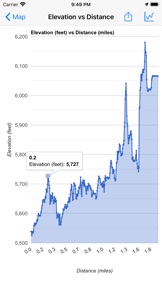
— Elevation vs distance.
— Elevation vs time.
— Speed vs track points.
— Speed vs distance.
— Speed vs time.
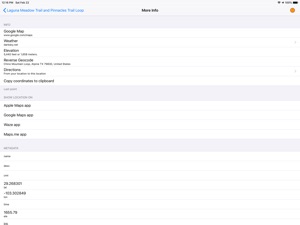
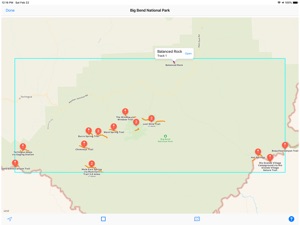
- Send the waypoints to various map apps such as Apple and Google Maps.
- Email the file.
- Optionally disable screen auto-lock to keep the device from sleeping.
- Create folders to better organize your GPX files.
- Preview the tracks for all files within a folder.
- Import GPX files to the current GPX file.
- Customize the color for waypoints, track points, routes and tracks.
- Hide or show the waypoints, track points, routes or tracks on the map.
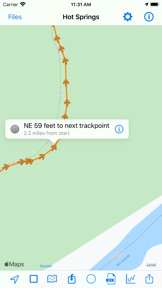
- View track points on map.
A sample GPX file is included.
We also have a GPX Viewer and GPX Editor for the Macintosh computer. Visit our web site for more info.
バージョン 3.8.32 の新機能
- New setting: Optimize tracks. When enabled, the minimum distance between track points is 1 meter. Track points less than 1 meter from the next track point are not used. This can be useful for larger files or files with a lot of track points. The original file is not altered.
- Warning now appears if the number of track points in a file is excessive and “show track points” is enabled in the settings. The warning can be disabled in the settings.
- Other bug fixes and app enhancements.
販売元
名前が
William Modesitt
情報
カテゴリ
バージョン
3.8.32
サイズが
4.7 MB
Game Center
いいえ
VPP Device Licensing
はい
レート
評価: 4+
互換性
iOS 11.4 以降
デバイス
iPhone 5s, iPhone 6, iPhone 6 Plus, iPhone 6s, iPhone 6s Plus, iPhone SE, iPhone 7, iPhone 7 Plus, iPhone 8, iPhone 8 Plus, iPhone X, iPhone XR, iPhone XS, iPhone XS Max, iPhone 11, iPhone 11 Pro, iPhone 11 Pro Max, iPhone SE (第 2 世代), iPad(第 5 世代) Wi-Fi, iPad(第 5 世代) Wi-Fi + Cellular, iPad(第 6 世代) Wi-Fi, iPad(第 6 世代) Wi-Fi + Cellular, iPad Pro, iPad Pro(Cellular), iPad Pro(9.7インチ), iPad Pro(9.7インチ)(Cellular), iPad Pro 12.9-inch (第 2 世代), iPad Pro 12.9-inch (第 2 世代) Wi-Fi + Cellular, iPad Pro (10.5-inch), iPad Pro (10.5-inch) Wi-Fi + Cellular, iPad Pro (11-inch), iPad Pro (11-inch) Wi-Fi + Cellular, iPad Pro 12.9-inch (第 3 世代), iPad Pro 12.9-inch (第 3 世代) Wi-Fi + Cellular, iPad Air, iPad Air(Cellular), iPad Air 2, iPad Air 2(Cellular), iPad Air(第 3 世代 ), iPad Air(第 3 世代 ) Wi-Fi + Cellular, iPad mini Retina, iPad mini Retina(Cellular), iPad mini 3, iPad mini 3(Cellular), iPad mini 4, iPad mini 4(Cellular), iPad mini(第 5 世代), iPad mini(第 5 世代) Wi-Fi + Cellular, iPad(第7世代) Wi-Fi + Cellular, iPad Pro 11 インチ (第 2 世代), iPad Pro 11 インチ (第 2 世代) Wi-Fi + Cellular, iPad Pro 12.9 インチ (第 4 世代), iPad Pro 12.9 インチ (第 4 世代) Wi-Fi + Cellular, iPod touch(第 6 世代 ), iPod touch(第7世代)
言語
英語
App Store: カスタマー評価
評価とレビュー
4.0/5 (17 つの評価)
App Store: カスタマーレビュー
入力なし